
Data Conversion & Automation
These requests can be used to upload datasets, run conversions and download datasets.
Prerequisites
Mapping commands must be pre-configured in ryze using the Dataset Mapper Plugin. You must enable a data transformation Add on for the standard/study. Enable the data transformation Add on by doing a test conversion in your standard/study in ryze.
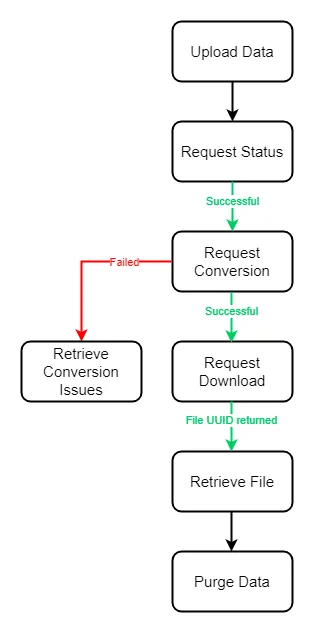
The following diagram shows an example flow for a conversion process:
Upload Dataset data for an Asset Group in a Container
POST {baseUrl}/fws/api/repository/container/containerAID/version/assetgroup/assetgroupAID/uploadMultipart POST, for example:
Host: ryze.formedix.com
Content-Type: multipart/form-data; boundary=----XXX
Authorization: Bearer 12345d-c123-1ce0-9893-0123456c83b

----XXX
Content-Disposition: form-data; name="file"; filename=".../AE1.zip"

(data)
----XXX
Content-Disposition: form-data; name="json"

{"fileFormat": "csv"}
----XXX
This request can be used to upload data for datasets in a given asset group. Use containerAID and version to specify the container, and assetGroupAID to specify the asset group. If the related metadata for the dataset asset does not exist, it is automatically created. If the related metadata for the dataset asset does exist, the existing metadata is updated.
fileFormat is optional, and specifies the format for the uploaded dataset files. Valid formats are SAS Transport v5 (xpt), Dataset XML (dsxml) and comma delimited (csv). UTF-8 encoding must be used in csv files. If not specified, this will default to "csv".
The file uploaded must be a zipped archive of one or more dataset data files in the requested format.
This request is sent as a multipart/form-data request. If the file format is unspecified, the first part of the multipart POST should be a JSON payload.
The UUID returned can be used to retrieve the status of the upload.
Example response:
{
  "uuid": "01234567-89ab-cdef-0123-456789abcdef"
}
Errors:
HTTP Status | Error Code |
|
|---|---|---|
400 | invalid_container_aid | An invalid AdministeredID was specified as the containerAID. |
400 | invalid_container_version | A non numeric value was specified as the version. |
400 | invalid_assetgroup_aid | An invalid AdministeredID was specified as the assetgroupAID. |
400 | dataset_cleanup_in_progress | When attempting to upload data on a container that is being cleaned up. |
404 | unknown_container | Unknown containerAID/version pair. |
404 | unknown_assetgroup | Unknown assetgroupAID within the containerAID/version pair. |
404 | invalid_addons | No addons available to be consumed. |
404 | duplicate_files | The zip file contains multiple datasets of the same name |
See also Common Errors
Upload Dataset data for a named Asset Group in a Container
POST {baseUrl}/fws/api/repository/container/containerAID/version/upload/nameMultipart POST, for example:
Host: ryze.formedix.com
Content-Type: multipart/form-data; boundary=----XXX
Authorization: Bearer 12345d-c123-1ce0-9893-0123456c83b

----XXX
Content-Disposition: form-data; name="file"; filename=".../CsvFile.zip"

(data)
----XXX
Content-Disposition: form-data; name="json"

{"fileFormat": "csv"}
----XXX
This request can be used to upload data for datasets in an asset group with a specified name. Use containerAID and version to specify the container, and name to specify the asset group. If the related metadata for the dataset asset(s) does not exist, it is automatically created. If the related metadata for the dataset asset(s) does exist, the existing metadata is updated.
‘fileFormat’ is optional, and specifies the format for the uploaded dataset files. Valid formats are SAS Transport v5 (xpt), Dataset XML (dsxml) and comma delimited (csv). UTF-8 encoding must be used in csv files. If not specified, this will default to "csv".
The file uploaded must be a zipped archive of one or more dataset data files in the requested format.
This request is sent as a multipart/form-data request. If the file format is unspecified, the first part of the multipart POST should be a JSON payload.
The file uploaded must be a zipped archive of one or more dataset data files in the requested format.
The UUID returned can be used to retrieve the status of the upload.
Example response:
{
  "uuid": "01234567-89ab-cdef-0123-456789abcdef"
}
Errors:
HTTP Status | Error Code |
|
|---|---|---|
400 | invalid_container_aid | An invalid AdministeredID was specified as the containerAID. |
400 | invalid_container_version | A non numeric value was specified as the version. |
400 | dataset_cleanup_in_progress | When attempting to upload data on a container that is being cleaned up. |
404 | unknown_container | Unknown containerAID/version pair. |
404 | invalid_addons | No addons available to be consumed. |
404 | duplicate_files | The zip file contains multiple datasets of the same name |
See also Common Errors
Retrieve Upload status for Dataset data in a Container
This request can be used to retrieve the status of a previously uploaded dataset data request. containerAID and version specify the container, and uuid specifies the upload request to track. If the container specified does not exist, or there is no matching upload request within this container for the given UUID, then an appropriate error is returned.
The status returned is one of: SUCCESSFUL, FAILED or INPROGRESS.
GET {baseUrl}/fws/api/repository/container/containerAID/version/upload/status/uuid
Example response:
{
  "uuid": "01234567-89ab-cdef-0123-456789abcdef",
  "containerAID": "01234567-89ab-cdef-0123-456789abcdef",
  "containerVersion": 0,
  "status": "SUCCESSFUL",
  "message": ""
}
Errors:
HTTP Status | Error Code |
|
|---|---|---|
400 | invalid_container_aid | An invalid AdministeredID was specified as the containerAID. |
400 | invalid_container_version | A non numeric value was specified as the version. |
400 | invalid_uuid | An invalid UUID was specified as the uuid. |
404 | unknown_container | Unknown containerAID/version pair. |
404 | unknown_upload | Unknown upload request uuid. |
See also Common Errors
Retrieve a List of Integrations for a Container
This request can be used to return a list of configured data integrations with remote systems for the container with the specified containerAID and version.
To determine if an integration is running, check the requestedand inProgressflags.
- requested = true: The integration is requested
- requested= false, inProgress = true: The integration is being processed
- requested= false, inProgress = false: The integration has completed.
GET {baseUrl}/fws/api/repository/container/containerAID/version/integration
Example response:
[
  {
    "uuid": "01234567-89ab-cdef-0123-456789abcdef",
    "system": "",
    "name": "",
    "inProgress": false,
    "requested": true
  },
  ...
]
Errors:
HTTP Status | Error Code |
|
|---|---|---|
400 | invalid_container_aid | An invalid AdministeredID was specified as the containerAID. |
400 | invalid_container_version | A non numeric value was specified as the version. |
404 | unknown_container | Unknown containerAID/version pair. |
See also Common Errors
Request that an Integration be Queued for Execution
PUT {baseUrl}/fws/api/repository/container/containerAID/version/integration/integrationUUID
This request triggers the integration with the given UUID (defined within the container) with the specified containerAID and version. This is a non-blocking call, it queues the integration for execution at the first available future point, and returns a success once the integration is queued.
If the specified integration is already queued, then an already_queued error is returned.
Example response:
{
}
Errors:
HTTP Status | Error Code |
|
|---|---|---|
400 | invalid_container_aid | An invalid AdministeredID was specified as the containerAID. |
400 | invalid_container_version | A non numeric value was specified as the version. |
400 | invalid_uuid | An invalid AdministeredID was specified as the integrationUUID. |
400 | already_queued | The specified integrationUUID is already in the queue to be executed. |
400 | remote_integration_error | Issue returned by the integration service. A context property may also be provided with a more specific error. For example, if authentication details for Rave Web Services are incorrect (e.g. incorrect or expired password), the context will be “Streamed REST call failed with: 401”. |
404 | unknown_container | Unknown containerAID/version pair. |
404 | unknown_integration | Could not find specified integrationUUID for given containerAID/version pair. |
See also Common Errors
Request a Data Conversion for an Asset Group
PUT {baseUrl}/fws/api/repository/container/containerAID/version/assetgroup/assetgroupAID/convert
Request that the dataset data for an asset group is generated using the rules defined in the Dataset Mapper Plugin in ryze.
Conversions can be run at asset group (study) level or run on a specific dataset within an asset group. Similar to the ryze user interface. The type of conversion that is run is reflected in the response to the ‘Retrieve the list of Conversion Tasks for a Container’ request.
Datasets are generated for the specified containerAID, version and assetgroupAID asynchronously and are made available in ryze when completed.
The conversion task UUID is returned and the caller may repeatedly poll requests to monitor the status of the conversion.
If your company has a P21E integration enabled, then the P21 validation is run automatically after the conversion task.
Example response:
{
    "uuid": "01234567-89ab-cdef-0123-456789abcdef"
}
Errors:
HTTP Status | Error Code |
|
|---|---|---|
400 | invalid_container_aid | An invalid AdministeredID was specified as the containerAID. |
400 | invalid_container_version | A non numeric value was specified as the version. |
400 | invalid_assetgroup_aid | An invalid AdministeredID was specified as the assetGroupAID. |
400 | conversion_for_asset_group_in_progress | A conversion for the specified asset group is already running. |
404 | unknown_container | Unknown containerAID/version pair. |
404 | unknown_assetgroup | Could not find specified assetgroupAID for given containerAID/version pair. |
See also Common Errors
Request a Data Conversion for a Dataset
PUT {baseUrl}/fws/api/repository/container/containerAID/version/assetgroup/assetgroupAID/convert/datasetAID
Request that the dataset data for a specific Dataset within an Asset Group is generated using the rules defined in the Dataset Mapper Plugin in ryze.
Conversions can be run at asset group (study) level or focused on a specific dataset within an asset group. Similar to the ryze user interface. The type of conversion that is run is reflected in the response to the ‘Retrieve the list of Conversion Tasks for a Container’ request.
The Dataset data with the given datasetAID is generated for the specified containerAID, version and assetgroupAID asynchronously and is made available in ryze when completed.
The conversion task UUID is returned, and the caller may poll requesting the conversion task to monitor the status of the conversion.
@
Example response:
{
    "uuid": "01234567-89ab-cdef-0123-456789abcdef"
}
Errors:
HTTP Status | Error Code |
|
|---|---|---|
400 | invalid_container_aid | An invalid AdministeredID was specified as the containerAID. |
400 | invalid_container_version | A non numeric value was specified as the version. |
400 | invalid_assetgroup_aid | An invalid AdministeredID was specified as the assetgroupAID. |
400 | invalid_asset_aid | An invalid AdministeredID was specified as the datasetAID. |
400 | conversion_for_asset_group_in_progress | A conversion for the specified asset group is already running. |
400 | conversion_for_dataset_in_progress | A conversion for the specified dataset is already running. |
404 | unknown_container | Unknown containerAID/version pair. |
404 | unknown_assetgroup | Could not find specified assetgroupAID for given containerAID/version pair. |
404 | unknown_dataset | Could not find specified datasetAID for the given containerAID/version/assetgroupAID triple. |
See also Common Errors
Cancel in-progress Data Conversion
DELETE {baseUrl}/fws/api/repository/container/containerAID/version/conversion/conversionTaskUUID
Request that the specified conversion task be cancelled.
Example response:
200 OK if successfulErrors:
HTTP Status | Error Code |
|
|---|---|---|
400 | invalid_container_aid | An invalid AdministeredID was specified as the containerAID. |
400 | invalid_container_version | A non numeric value was specified as the version. |
400 | invalid_uuid | An invalid UUID was specified as the conversionTaskUUID. |
400 | conversiontask_not_in_progress | Conversion task is not in progress. |
404 | unknown_container | Unknown containerAID/version pair. |
See also Common Errors
Retrieve the list of Conversion Tasks for a Container
GET {baseUrl}/fws/api/repository/container/containerAID/version/conversion
This request can be used to return the list of conversion tasks that have been performed within the container with the specified containerAID and version in the system.
Conversions can be run at asset group (study) level or focused on a specific dataset within an asset group. The type of conversion that is run is reflected in the response. This request can be used to return the list of conversion tasks that have been performed within the container with the specified datasetAID (when running a conversion at dataset level), containerAID and version in the system.
Up to 250 of the most recent records are retrieved and returned.
Response when running the conversion task at Asset Group level:
[
    {
        "uuid": "c82dfd61-2920-47b3-b5a7-f8192fc9b6a7",
        "requested": "20220817T103834.461Z",
        "completed": "20220817T103835.388Z",
        "status": "Successful",
        "conversionType": "ASSETGROUP",
        "assetGroup": {
            "aid": "1861ad74-da57-40ff-8537-78348f8ba19e"
        },
        "latest": false
    }
]
Response when running the conversion task at Asset level:
[
    {
        "uuid": "e1700e1f-cdf3-4bee-a4a1-d1e9a2d04c92",
        "requested": "20230516T141706.552Z",
        "queued": "20230516T141708.956Z",
        "started": "20230516T141708.972Z",
        "completed": "20230516T141709.747Z",
        "status": "Successful",
        "conversionType": "ASSET",
        "assetGroup": {
            "aid": "54c513ae-5b88-421b-bd5a-e60bdf165d55"
        },
        "asset": {
            "aid": "d2c30dce-fd0f-462c-89ff-b36036233452",
            "name": "AE"
        },
        "latest": false
    }
]
The response fields when running the conversion task at Asset Group level can include the following values:
Key | Value |
|---|---|
uuid | generated from the 'Request a Data Conversion...' request |
requested | time in ISO 8601 format |
queued | time in ISO 8601 format |
started | time in ISO 8601 format |
completed | time in ISO 8601 format |
status | Successful , Failed , Preparing , Queuedor In Progress |
conversionType | ASSET or ASSETGROUP |
assetGroup | AID |
asset | AIDand Name |
latest | true or false |
Responses when running the conversion task at Dataset level include additional details, including the administeredID (AID) and name.
The last conversion task to be run is indicated with "latest": true. This is not necessarily the last record returned in the response.
Errors:
HTTP Status | Error Code |
|
|---|---|---|
400 | invalid_container_aid | An invalid AdministeredID was specified as the containerAID |
400 | invalid_container_version | A non numeric value was specified as the version. |
404 | unknown_container | Unknown container AID/version pair. |
See also Common Errors
Retrieve the list of Conversion Issues for a Conversion Task
GET {baseUrl}/fws/api/repository/container/containerAID/version/conversion/ conversionTaskUUID/issues
This request returns the list of issues that occurred during a conversion task run. The conversion task is identified by the conversionTaskUUID within the container with the specified containerAID and version.
Example response:
[
  {
    "sourceDatasetAID": "01234567-89ab-cdef-0123-456789abcdef",
    "sourceDataset": "",
    "sourceRow": "",
    "sourceVariable": "",
    "targetDatasetAID": "01234567-89ab-cdef-0123-456789abcdef",
    "targetDataset": "",
    "targetRow": "",
    "targetVariable": "",
    "targetValue": "",
    "ruleID": "",
    "message": ""
  },
  ...
]
Errors:
HTTP Status | Error Code |
|
|---|---|---|
400 | invalid_container_aid | An invalid AdministeredID was specified as the containerAID |
400 | invalid_container_version | A non numeric value was specified as the version |
400 | invalid_uuid | An invalid UUID was specified as the containerTaskUUID |
404 | unknown_container | Unknown containerAID/version pair. |
404 | unknown_conversiontask | Could not find specified conversionTaskUUID for given containerAID/version pair. |
See also Common Errors
Request Download of Data for an Asset Group
PUT   {baseUrl}/fws/api/repository/container/containerAID/version/assetgroup/assetgroupAID/data

{
  "dateTime": "ccyymmddThhmmssZ",
  "fileFormat": "xpt",
  "encoding": "UTF-8"
}
Request for the dataset data present for the given containerAID, version and assetgroupAID to be archived and made available to download.
This request returns a UUID if the specified asset group has data. If the asset group has no data, then the response from the Retrieve a Previously Prepared File request is 404 : unknown_file.
AdateTime value is optional but the dateTime parameter must be included in the payload. If you send an empty string ""it defaults to the current UTC dateTime.
fileFormat is optional, and specifies the format to use for the archived dataset files. Valid formats are SAS Transport v5 (xpt), Dataset XML (dsxml) and comma delimited (csv). If not specified, this defaults to "csv".
A unique identifier for the future prepared download is returned to the caller, which can then subsequently be used to request download of the prepared file. The returned UUID is used in the file retrieval call as the fileUUID.
encoding is an optional string property. You can specify either LATIN or UTF-8 encoding. If no encoding is specified, it defaults to LATIN. If invalid encoding is encountered, it returns an invalid_encoding error.
See also Retrieve a Previously Prepared File
Example response:
{
  "uuid": "01234567-89ab-cdef-0123-456789abcdef"
}
Errors:
HTTP Status | Error Code |
|
|---|---|---|
400 | invalid_container_aid | An invalid AdministeredID was specified as the containerAID. |
400 | invalid_container_version | A non numeric value was specified as the version. |
400 | invalid_assetgroup_aid | An invalid AdministeredID was specified as the assetgroupAID. |
400 | invalid_datetime | dateTime specified was not understood. If present, should be an ISO8601 string as detailed above. |
400 | invalid_fileformat | The fileFormat specified was not recognised. Valid file formats are as detailed above. |
400 | invalid_encoding | An invalid encoding type is entered in the encoding field. |
400 | no_data_for_download | No files were able to be prepared for download for this request. |
404 | unknown_container | Unknown containerAID/version pair. |
404 | unknown_assetgroup | Could not find specified assetgroupAID for given containerAID/version pair. |
404 | unknown_dataset | Could not find any file for the specified assetgroupAID for given containerAID/version pair. |
See also Common Errors
Request Deletion of all Dataset Data for a Version of a Container
DELETE {baseUrl}/fws/api/repository/container/containerAID/version/purgedata
This request removes the following:
- dataset data
- any issues reported during conversion of dataset data
- metadata associated with the dataset data that was generated.
Pre-existing non-generated metadata remains in the system. Conversion task and repository logs for the removed datasets also remain in the system.
Example response:
{
}
Errors:
HTTP Status | Error Code |
|
|---|---|---|
400 | invalid_container_aid | An invalid AdministeredID was specified as the containerAID. |
400 | invalid_container_version | A non numeric value was specified as the version. |
404 | unknown_container | Unknown containerAID/version pair. |
See also Common Errors